Short answer: Choose HubSpot if inbound marketing (forms, landing pages, email nurture) drives your pipeline and you want sales and marketing in one system. Choose Tailr CRM if most deals start as replies to cold email or LinkedIn: it turns those replies into assigned leads automatically, costs one flat monthly price, and carries your brand.
Key takeaways
- HubSpot Sales Hub Starter is about $15 per seat per month, but sales automation and forecasting sit on Professional at about $90 per seat plus a one-time $1,500 onboarding fee.
- For 10 users on Professional, year one is about $12,300; Tailr CRM's Team plan is about $790 in year one on the yearly plan, with no setup fee.
- HubSpot's real strength is the marketing side. If you will not use it, you are paying for it anyway in the per-seat price.
- Some teams keep HubSpot Marketing for inbound and run outbound sales in a separate, cheaper CRM.
Contents
- The HubSpot pricing ladder, step by step
- Where outbound teams pay for things they do not use
- A worked example: an 8-SDR outbound agency
- Where HubSpot is genuinely better
- The hybrid setup many teams end up with
- Five questions to decide in ten minutes
- How a cold email reply reaches the CRM: HubSpot vs Tailr CRM
- Three-year cost as your team grows
- Moving from HubSpot to Tailr CRM: a field-by-field guide
- Bottom line
- Sources
- FAQs
HubSpot is probably the most recommended CRM on the internet, and for good reason. Its free CRM is generous, its marketing tools are excellent, and it has an app for everything. The question for an outbound team is simpler: how much of HubSpot will you actually use, and what will you pay for the rest?
The HubSpot pricing ladder, step by step
HubSpot is easy to start and expensive to grow. Here is how a sales team typically climbs it (list prices, annual billing, checked October 2026):
| Step | Sales Hub plan | Price | What usually triggers the move |
|---|---|---|---|
| 1 | Free CRM | $0 | Contacts, deals and a pipeline for a couple of founders |
| 2 | Starter | ~$15 per seat/month | You hire your first reps and want basic sales tools |
| 3 | Professional | ~$90 per seat/month + ~$1,500 onboarding | You need automation, forecasting and proper reporting |
The step that hurts is 2 to 3. A 10-person team moving to Professional goes from roughly $1,800 a year to about $12,300 in year one, because every seat is billed at the higher rate and the onboarding fee is mandatory.
Where outbound teams pay for things they do not use
HubSpot is designed around a buyer who finds you: reads a blog post, fills a form, gets nurtured by email, then talks to sales. Outbound works the other way round. You find the buyer, you send the first message, and the pipeline starts with a reply. For an outbound team that means:
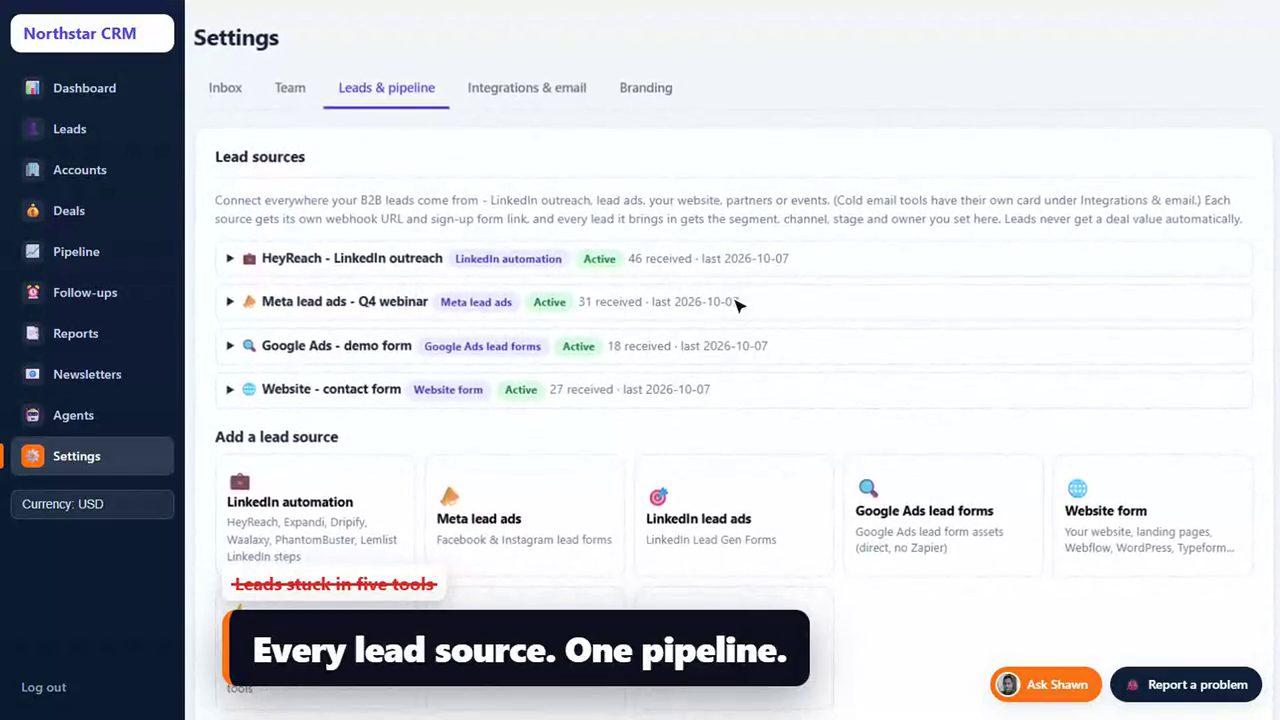
- Your sending happens elsewhere. Most teams send cold email from Smartlead, Instantly or lemlist to protect deliverability and sender reputation, not from the CRM.
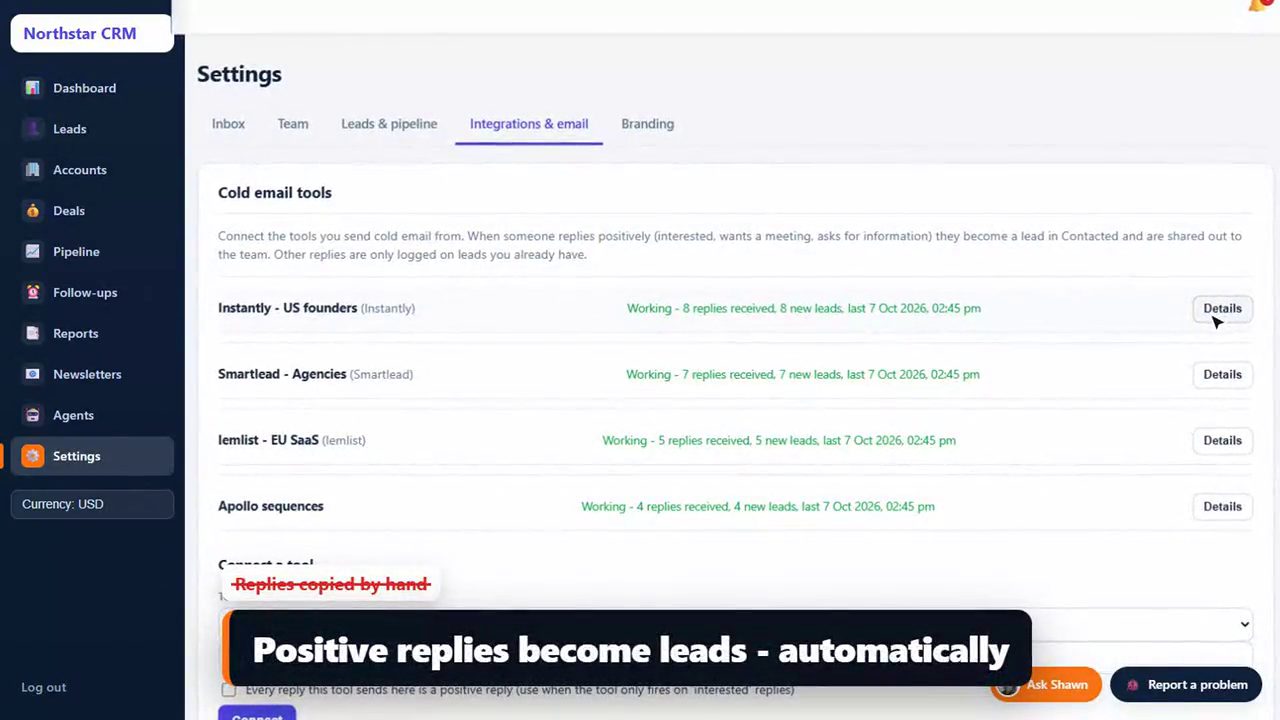
- Replies have to travel back. A positive reply in your sending tool needs an integration or a Zapier zap to become a HubSpot contact and deal, with an owner and a task. Every hand-built zap is something that can break silently (our CRM integration best practices explain what to check).
- The marketing engine sits idle. Landing pages, forms, nurture emails and attribution are wonderful, but an outbound sales team rarely touches them.
A worked example: an 8-SDR outbound agency
Imagine an agency with 8 SDRs, 1 account manager and 1 founder, running cold email for six clients. On a typical day 20 to 40 positive replies arrive across all campaigns. The full list of what an agency like this needs is in our 12-feature CRM checklist for lead generation agencies.
| HubSpot Sales Pro | Tailr CRM (Team plan) | |
|---|---|---|
| Year-one software cost (10 users) | ~$12,300 | ~$790 (yearly plan), no setup fee |
| How a positive reply becomes a lead | Integration or Zapier per sending tool, built and maintained by you | Built in for Smartlead, Instantly, lemlist and Apollo; any other tool via webhook |
| Who sets it up | You, with the paid onboarding | Ready in minutes, plus unlimited 1:1 onboarding during the trial |
| Client logs in and sees | HubSpot | Your agency's name and logo |
| Hiring 5 more SDRs next year | 5 more Professional seats (~$5,400/year) | Same flat price up to 15 users |
Try it with your own logo, in two minutes
Tailr CRM's 14-day trial opens a CRM with your company name and sample data. Connect one campaign and watch a reply become a lead.
14 days free · no card · no setup fee
Where HubSpot is genuinely better
- Inbound marketing. If content, SEO, forms and nurture produce a big share of your pipeline, HubSpot's marketing tools are hard to beat.
- One system for marketing and sales. Attribution from first website visit to closed deal is a real strength.
- Ecosystem. Thousands of integrations and a large pool of consultants.
- The free CRM. For two founders tracking a handful of deals, it costs nothing.
Tailr CRM does not try to compete on any of these. It has no landing pages, no marketing emails and no built-in dialer; it is a sales CRM for teams whose pipeline starts with outbound. For a like-for-like pipeline comparison, see Tailr CRM vs Pipedrive.
The hybrid setup many teams end up with
You do not have to choose one or the other. A common pattern for companies doing both inbound and outbound:
- Keep HubSpot (Marketing Hub) for the website, forms, content and nurture.
- Run outbound sending in Smartlead, Instantly or lemlist, from dedicated sending domains and inboxes rather than your main domain (check their SPF, DKIM and DMARC with our free email DNS checker).
- Send positive outbound replies, and sales-ready inbound leads via a form or webhook link, into Tailr CRM, where the sales team works one pipeline.
Your marketers keep their tools, your reps get a CRM built around how they actually sell, and you stop paying Professional sales seats for people who only need a pipeline.
Five questions to decide in ten minutes
1. What share of last quarter's new pipeline came from inbound (forms, content) vs outbound (cold email, LinkedIn, calls)?
2. Which tool do we send cold email from today, and how do positive replies reach the CRM?
3. How many sales users will we have in 12 months? Price HubSpot Professional for that number.
4. Do clients or partners log in to our CRM? Does it matter whose logo they see?
5. Who will build and maintain automations and integrations: a person on our team, or the vendor?

Mostly inbound + someone to run it  -> HubSpot
Mostly outbound + growing team      -> Tailr CRM (or HubSpot Marketing + Tailr CRM for sales)
How a cold email reply reaches the CRM: HubSpot vs Tailr CRM
This is the workflow that decides whether outbound leads get worked in minutes or in days. Here is the typical path for a positive reply in a HubSpot setup built with Zapier, next to the path in Tailr CRM.
Typical HubSpot + Zapier path: each step is a zap or a manual action someone maintains.
Tailr CRM path: the same rules every time, no zaps to maintain.
Three-year cost as your team grows
CRM decisions last years, so price the team you are building, not the one you have. Assume an outbound team that grows from 5 to 10 to 15 users over three years. If an enterprise platform is on your shortlist too, our Salesforce cost breakdown runs the same numbers.
| Year | Users | HubSpot Sales Pro (~$90/seat + onboarding) | Tailr CRM Team (up to 15 users) |
|---|---|---|---|
| 1 | 5 | ~$6,900 (incl. $1,500 onboarding) | ~$790 |
| 2 | 10 | ~$10,800 | ~$790 |
| 3 | 15 | ~$16,200 | ~$790 |
| 3-year total | ~$33,900 | ~$2,370 |
List prices, annual billing, before taxes and any add-ons. HubSpot prices change often; check the current figure for your seat count.
Moving from HubSpot to Tailr CRM: a field-by-field guide
- Export. From the Contacts, Companies and Deals index pages in HubSpot, export all records with all properties to CSV. Export your deal pipelines' stage names too.
- Map properties. Use the table below as a starting point; Shawn finalises it with you on an onboarding call.
- Decide what stays in HubSpot. If you keep Marketing Hub, keep forms and nurture there and send sales-ready leads to Tailr CRM through a form or webhook link.
- Connect sending tools. Add your Smartlead, Instantly, lemlist or Apollo API keys so new replies flow straight into Tailr CRM.
- Run both for two weeks. Work new outbound replies in Tailr CRM while old deals finish in HubSpot, then switch fully.
| HubSpot | Tailr CRM | Note |
|---|---|---|
| Company | Account | One account per company; contacts from the same company merge into one lead |
| Contact | Contact on a lead or account | Email, phone, title, LinkedIn |
| Deal + deal stage | Deal on your pipeline | Your own stage names, set up with you during onboarding |
| Contact owner / deal owner | Lead owner | Future leads assign automatically |
| Lead source / original source | Lead source | Each source (form, webhook, sending tool) is tracked separately |
| Custom properties | Custom fields | Added with you during onboarding |
Bottom line
HubSpot is the right home for inbound-led companies that will use its marketing engine. For outbound teams and agencies, most of the Professional price buys features they never switch on, while the one thing they need most, replies becoming owned leads with follow-ups, still has to be wired up by hand. If that sounds like you, test Tailr CRM with one live campaign before your next HubSpot renewal. Plans and features are on the Tailr CRM page, the other head-to-heads are in our CRM comparison guides, and short answers to common CRM questions are in our answers hub.
Want the outbound replies as well as the CRM?
B2BXclusive runs cold email, LinkedIn and calling for B2B teams in the US, UK/EU, Middle East and India, with every positive reply landing in your CRM.
30-minute call · no obligation
HubSpot is a trademark of its respective owner; B2BXclusive is not affiliated with it. Prices checked on 2026-10-07.
Sources
- HubSpot Sales Hub pricing: hubspot.com/pricing/sales (checked October 2026; Starter ~$15/seat, Professional ~$90/seat annual, onboarding ~$1,500)
- Tailr CRM plans and features: b2bxclusive.com/tailr-crm
HubSpot Too Expensive for Outbound?
Get this guide as a printable PDF cheat sheet: the short answer and key takeaways, 4 comparison tables, 1 copy-ready template, 6 quick answers.
Frequently asked questions
Is HubSpot good for cold email outreach?
HubSpot can send sequences on paid Sales Hub plans, but most outbound teams send cold email from a dedicated tool like Smartlead, Instantly or lemlist for deliverability reasons. The weak point is bringing the replies back: positive replies usually reach HubSpot through an integration or Zapier, not natively.
Why is HubSpot Professional so much more expensive than Starter?
Professional unlocks the sales automation, forecasting and reporting most growing teams need, and it is priced per seat with a mandatory onboarding fee. The jump from Starter to Professional is where HubSpot bills grow fastest.
Can I use HubSpot for marketing and Tailr CRM for sales?
Yes. If HubSpot Marketing runs your inbound, you can keep it and route outbound replies into Tailr CRM, where your sales team works the pipeline. Leads from website forms can also flow into Tailr CRM through a sign-up form or webhook link.
How long does it take to move from HubSpot to Tailr CRM?
Most teams are working in Tailr CRM within their 14-day free trial. Export contacts, companies and deals from HubSpot as CSV; Shawn helps you import them and connect your cold email tools on 1:1 onboarding calls. Complex moves can use the optional done-for-you migration (from $299).
Does Tailr CRM have a free plan like HubSpot?
No free plan, but a 14-day free trial with no card needed, and paid plans start at $59 per month for up to 5 users.
Does Tailr CRM charge per seat like HubSpot?
No. Tailr CRM charges one flat monthly price per plan: Starter $59 for up to 5 users, Team $79 for up to 15 and Growth $149 for up to 40, with 2 months free on yearly billing. Every plan has every feature, there is no setup fee, and adding a rep within your plan's limit costs nothing.

About the author
Subhendu J Shawn is the founder of B2BXclusive, a B2B outbound sales and lead generation agency, and the creator of Tailr CRM. His experience spans American Express and Amazon, and he has helped 50+ B2B companies build pipeline across the US, Europe, the Middle East and India. All articles by Shawn · Follow on LinkedIn